

If you're budgeting IT for a 30-person law firm in North Texas, expect to invest between $4,500 and $10,500 per month for fully managed IT services. Your final cost depends on cybersecurity requirements, Microsoft 365 licensing, cloud infrastructure, backup strategy, and the legal applications your firm relies on every day.
For litigation firms, IT isn't simply another overhead expense--it's a critical part of keeping attorneys productive, protecting confidential client information, and ensuring technology performs when it matters most. Whether you're preparing for trial, hosting a deposition, or supporting a hybrid hearing, technology failures can cost valuable time, damage client confidence, and potentially affect case outcomes.
In this guide, we'll explain what drives managed IT pricing, what's typically included, and how to determine the right technology budget for your law firm.
What Determines Managed IT Pricing for a Law Firm?
Every law firm is unique, but several key factors influence the monthly cost of managed IT services.
Number of Users
Most managed IT providers price their services on a per-user basis. A firm with 30 attorneys and staff members requires significantly different support than a five-person practice.
Cybersecurity Requirements
Modern law firms are increasingly targeted by cybercriminals because they store confidential client information, financial records, intellectual property, and privileged communications.
A comprehensive cybersecurity program may include:
- Multi-factor authentication (MFA)
- Endpoint Detection and Response (EDR)
- Email security
- Security awareness training
- Dark web monitoring
- Continuous vulnerability management
The more advanced your security requirements, the greater your monthly investment--but also the greater your protection against costly breaches.
Microsoft 365 and Cloud Services
Most firms rely on Microsoft 365 for email, collaboration, document sharing, and Teams meetings.
Costs vary depending on:
- Microsoft licensing
- SharePoint usage
- OneDrive storage
- Azure cloud services
- Remote desktop environments
Legal Software Support
General IT providers may understand Microsoft Windows, but law firms also rely on specialized legal technology.
Examples include:
- Clio
- Trial presentation software
- PDF and document management applications
- Time and billing systems
- Secure file sharing platforms
An MSP familiar with legal workflows can resolve issues faster because they understand how these applications work together.
Office Technology
Technology extends beyond desktops.
Today's litigation firms often depend on:
- Conference room technology
- Video conferencing systems
- Deposition equipment
- Wireless presentation systems
- Digital evidence displays
Reliable meeting-room technology has become essential for client meetings, mediations, depositions, and hybrid hearings.
What's Usually Included in Managed IT Services?
While every provider structures services differently, a comprehensive managed IT agreement should include these core services:
Unlimited Help Desk Support
Employees should have immediate access to experienced technicians whenever technology problems arise.
Live Phone Support
When attorneys are preparing for court, waiting in a support queue isn't ideal. Speaking directly with a knowledgeable technician can significantly reduce downtime.
24/7 Monitoring
Proactive monitoring allows potential issues to be identified and resolved before they interrupt your firm's operations.
Microsoft 365 Administration
Managing users, licensing, security settings, Teams, and SharePoint requires ongoing attention.
Backup and Disaster Recovery
Your firm's data should be backed up securely and recoverable in the event of ransomware, hardware failure, or accidental deletion.
Cybersecurity Protection
Modern managed IT should include multiple layers of security--not just antivirus software.
Vendor Management
Your IT provider should coordinate directly with internet providers, software vendors, copier companies, and legal software support when problems occur.
Strategic Technology Planning
Technology should support your firm's long-term growth, not simply fix today's issues.
Hidden Costs Law Firms Should Watch For
One of the biggest frustrations firms experience is unexpected IT invoices. Before signing an agreement, ask whether these items are included:
- Microsoft licensing
- After-hours support
- New employee setup
- Security monitoring
- Backup storage
- Technology consulting
- Compliance assistance
- Hardware replacement planning
- On-site support
A lower monthly price can sometimes lead to higher overall costs because of additional service charges.
Example Budgets
Every firm is different, but these examples illustrate common scenarios and typical investment levels.
Example 1: 25 Person Litigation Firm
- One office
- Microsoft 365
- Clio
- Standard cybersecurity
- Hybrid work
Estimated Investment: $3,750--$6,250 per month
Example 2: 30 Person Litigation Firm
- One primary office
- Advanced cybersecurity
- Microsoft 365 Business Premium
- Clio
- Conference room technology
- Backup and disaster recovery
Estimated Investment: $4,500--$7,500 per month
Example 3: 45 Person Law Firm
- Multiple locations
- Advanced compliance
- Cloud infrastructure
- Trial presentation technology
- Executive technology planning
Estimated Investment: $6,750--$10,500 per month
How to Evaluate an MSP Beyond Price
Price matters, but value matters more.
When evaluating managed IT providers, consider these five questions:
1. Do They Understand Law Firms?
Ask how many legal clients they support and what legal software they work with every day.
2. Can They Support Litigation Technology?
Conference rooms, trial preparation, video evidence, and courtroom presentations require specialized experience.
3. Do They Answer the Phone?
During a technology emergency, speaking with a real technician is often more valuable than submitting an online ticket.
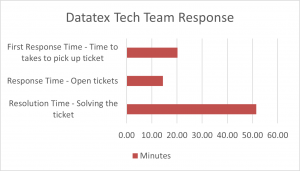 4. How Fast Do They Respond?
Ask for documented response-time commitments not just promises.
5. Will They Help You Plan for the Future?
The best MSPs act as technology advisors, helping firms budget, improve security, and prepare for growth.
A Real-World Example
A law firm that became our client was experiencing challenges caused by aging computer equipment. Staff members were dealing with slow system performance, longer application load times, and frequent technology frustrations that negatively impacted productivity and client service. Their existing workstations could no longer support the demands of a modern legal practice.
As their Managed Service Provider, we worked closely with the firm's leadership to develop a technology refresh plan that minimized disruption and maximized productivity. We procured and deployed new business-class computers for employees, replaced outdated equipment, and upgraded each workstation with dual monitors to enhance efficiency and workflow.
To ensure a seamless transition, our team carefully migrated user data, applications, and settings from the old systems to the new devices. We preconfigured user accounts, installed required software, and tested each workstation before deployment. By following a structured rollout process, we were able to replace the computers and have employees back up and running quickly with minimal downtime.
The result was a significant improvement in system performance, employee productivity, and user satisfaction. Attorneys and staff benefited from faster computers, improved multitasking capabilities through dual-screen setups, and a more reliable technology environment. The law firm was able to reduce technology-related interruptions, improve operational efficiency, and focus more time on serving their clients rather than dealing with IT issues.
While every firm's environment is different, our knowledge and experience are what set firms up for wins. We will continue with biannual technology forecasting and system metrics through our TBR (Technology Business Review) meetings to ensure we are on track for the company's success.
Why Law Firms Choose DataTex
For decades, DataTex has helped North Texas organizations leverage technology to improve productivity and reduce business risk.
Our legal clients value our:
- Experience supporting litigation law firms
- Knowledge of Clio and legal technology
- Conference room and trial technology expertise
- Live technicians who answer support calls
- Fast response times
- Proactive cybersecurity approach
- Strategic technology guidance
We understand that technology isn't just about keeping computers running--it's about helping attorneys serve their clients with confidence.
Ready to Plan Your Law Firm's IT Budget?
If your law firm is evaluating managed IT services, we'd be happy to review your current environment, discuss your goals, and help you determine an appropriate technology budget based on your firm's size, security requirements, and growth plans.
If you have an understaffed IT department and are looking for additional help, we provide co-managed services that fill in the gaps with specialized expertise and automation tools you may need--without the cost and difficulty of finding, managing, and retaining a large IT staff or buying expensive software tools separately.
Whether you're comparing providers or simply looking for a second opinion, an informed technology strategy can help your firm avoid unnecessary costs while improving reliability, security, and attorney productivity.
Take the Guesswork Out of IT Budget Planning
Whether you're budgeting for managed IT services or looking to supplement your internal team, we'll help you determine the right technology investments for your firm's needs and goals.

